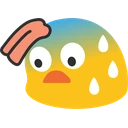
PogGun Discord emoji
Also called: gunchamp, gunog
Tags
No tags yet. Add the first one.
Discord preview
Share & embed
How to add it
Discord
- Download the file with the button above.
- Open your server's settings and go to Emoji.
- Click Upload Emoji and pick the file.
- Type its name between colons in any channel to use it.
Slack
- Download the file with the button above.
- In Slack, open the emoji picker and choose Add Emoji.
- Upload the file and give it a name.
- Use it by typing its name between colons in any message.
Guilded
- Download the file with the button above.
- Open your server's settings and go to Emotes.
- Click Upload emote, pick the file and name it.
- Use it from the emote picker in any channel.
Twitch
- Download the file with the button above.
- Open your Creator Dashboard and go to Viewer Rewards, then Emotes.
- Upload the file to an emote slot; Twitch resizes it for you.
- Set its code and save, and your subscribers can use it.
Microsoft Teams
- Download the file with the button above.
- In a Teams chat, open the emoji picker.
- Choose Your emojis, then the plus to add a custom emoji.
- Upload the file and give it a name.
- Save the image to your phone.
- In a WeChat chat, open the Stickers panel.
- Tap the heart tab, then the plus to add a sticker.
- Pick the image; it is now in your favourites.
Servers using this emoji

Active 224K online
Geometry Dash
The official Discord server for the popular rhythm-based action platformer game, Geometry Dash!
2.2M members 0 upvotes
Request to Join Server — Geometry Dash (opens in a new tab)

Very active 8.4K online
Sweatcord
Destiny 2 raid-focused community for Sweatcicle fans—builds, challenges, and gaming discussions centered on endgame content.
28.5K members 0 upvotes
Request to Join Server — Sweatcord (opens in a new tab)

Very active 7.6K online
Dark Souls Archthrones
Join to follow the Archthrones mod development.
23.9K members 0 upvotes
Request to Join Server — Dark Souls Archthrones (opens in a new tab)