
How to Survive a Raid on Your Discord Server
Raids are won or lost in the first minute, and almost entirely by what you configured before they started. A practical timeline: prepare, lock down, clean up, review.
A raid is a coordinated flood of accounts joining your server to spam, ping, post gore or shock content, or just make the place unusable. Most are automated, most last under ten minutes, and most damage comes from the response being slow rather than from the raid being clever.
What a raid actually looks like
Three patterns cover the majority of incidents:
- Join flood. Dozens to hundreds of accounts join within a minute, usually accounts created the same week, often with similar usernames or identical default avatars. They then post the same message everywhere they can.
- Ping raid. A handful of accounts, sometimes only one, spam @everyone-shaped mass mentions or long lists of user mentions to drive notifications to every member.
- Content raid. Fewer accounts, deliberately awful media, aimed at getting your server reported and your members traumatised. This one is the reason your response speed matters most.
A fourth case is not a raid at all: one compromised member account posting a scam link in every channel it can reach. Handle it the same way, then tell the owner to change their password and revoke their sessions.
Prepare, because there is no time to configure during
Five things, all doable in one sitting.
- Turn on Discord's raid protection and safety alerts. Server Settings has a safety section where Discord will challenge suspicious join activity and post activity alerts to a channel you choose. Pick a staff channel and make sure it pings your on-call role, not @everyone.
- Set a mention spam AutoMod rule with timeout. A threshold of five unique mentions blocks the entire ping-raid category before a human sees it.
- Raise the floor on who can talk. Verification level, a rules screening gate, or a role gate all buy you time. New accounts with no email verification are the raw material of every join flood.
- Pre-build a lockdown. Create a role or a permission set that removes Send Messages from @everyone in every public channel, and know exactly where the button is. Practise it once on a quiet Tuesday.
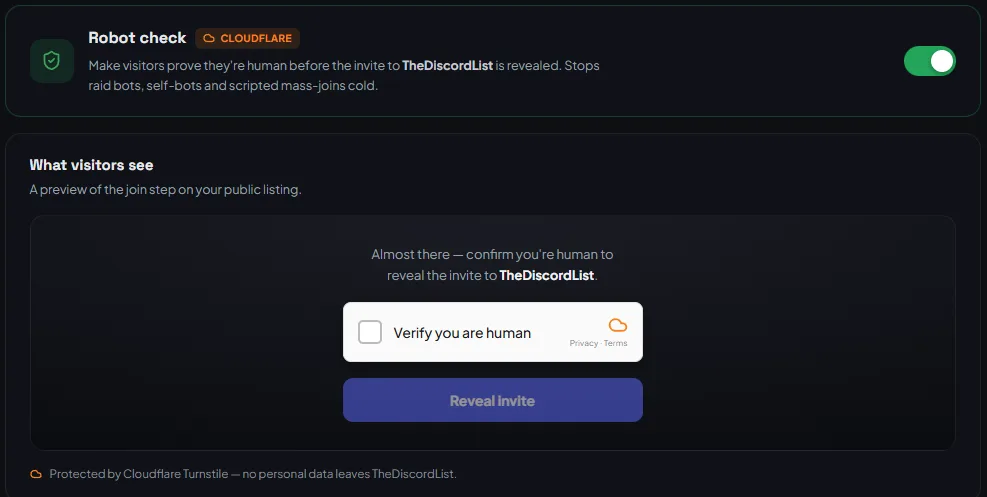
- Fix your invite hygiene. Delete old permanent invites you do not recognise. Know which invite links you actually publish, so you can revoke the leaked one later without cutting off your real traffic. If you list on TheDiscordList, turn on the free Robot check so visitors pass a Cloudflare challenge before the invite is revealed, and let the TheDiscordList bot issue rotating invites that refresh every five minutes, so a scraped link goes stale on its own.
The first 60 seconds
Stop the inflow first. Cleanup is easy later; a raid that keeps growing is not.
- Pause invites. Discord's Security Actions, opened from the server menu, the Members page or a raid alert, include Pause Invites, which stops new members joining for a period you choose, and a separate Pause DMs that stops members who are not friends from messaging each other. Pausing invites is the single most effective button during a join flood and it is reversible.
- Lock the public channels. Remove Send Messages from @everyone across the channels being hit. Do not delete channels, do not kick anyone yet.
- Pause invites on your listings too. If you list on TheDiscordList, pause invites on the listing's Discovery tab, so visitors get a notify-me page instead of an invite into the raid.
- Post one message in a channel members can still read. "We are handling a raid, channels are locked for a few minutes, do not click any links posted in the last ten minutes." That sentence prevents the second wave of damage, which is your own members clicking a phishing link.
Do not start banning yet. Banning one account at a time while three hundred keep joining is how moderators lose ten minutes they needed.
The next 10 minutes
Now the door is shut, work through it in order.
- Collect evidence first. Copy message links and user IDs into a staff channel before anything is deleted. Discord's Trust and Safety team needs them, and the next steps wipe them.
- Identify the join window. Open Server Settings → Members and sort by Member Since, newest first; the audit log does not record joins. Everything you do next targets that window, not "anyone who looks suspicious".
- Mass ban with message deletion. On the Members page, tick the raid accounts and choose Ban Members; you can delete up to the last 7 days of their messages in the same step. It needs Manage Server and Ban Members, and Discord asks for 2FA or your password. For hundreds of accounts, a bot from the auto-moderation category can ban a whole join-time range in one command.
- Raise verification temporarily. Bump the server to phone verification for an hour if the raiders keep coming back with fresh accounts. Set a reminder to lower it, because it also blocks a large share of legitimate new members.
- Report to Discord. Raids run through Discord's own systems and their Trust and Safety team acts on organised raiding. Send them the evidence you collected first.
Cleanup
Unlock channels one at a time, starting with your most active one, so you can watch for stragglers before reopening everything.
Check what the raid actually touched. Scan for role changes, channel permission edits, webhook creations and deletions in your audit log. A raid is occasionally cover for something quieter, and a leftover webhook is a permanent posting hole that survives every ban.
Rotate the invite that leaked, then post one short public note: what happened, what you did, whether anything private was exposed. Members forgive an incident. They do not forgive silence about one.
The post-mortem, same week
Write five lines while it is fresh: how they got in, how long until someone noticed, what was already configured that helped, what you had to improvise, and the one setting you are changing as a result. Time-to-notice is the number worth tracking. If it was eleven minutes, the fix is coverage or alerting, not stricter rules.
Most servers discover the same gap here: nothing was recorded. Deleted messages, edited messages and role changes vanish unless something captured them, which is the case for keeping a bot from the logging category running permanently rather than installing one after an incident. If your stack is thin generally, the wider bot directory is a faster way to compare options than asking in a support server mid-crisis.
Block out fifteen minutes today and do the lockdown practice run: pause invites, lock one channel, unlock it. Knowing where those two buttons are is worth more than any rule you write.
