
chocobo PFPs
Profile pictures shared by the community, each shown once however many people use it. Download any of them in full quality.
chocobo PFPs · 1
Showing 1 of 1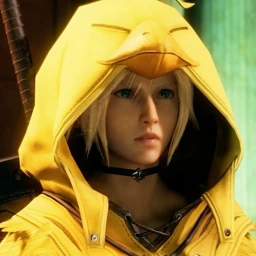
That’s everything.
Popular PFP tags
- Anime PFPs 19
- Gaming PFPs 11
- Cute PFPs 6
- final-fantasy PFPs 6
- Matching PFPs 5
- final-fantasy-7 PFPs 4
- pink PFPs 4
- chainsaw-man PFPs 2
- cloud PFPs 2
- cloud-strife PFPs 2
- devil PFPs 2
- devil-hunter PFPs 2
- shark PFPs 2
- aerith PFPs 1
- aerith-gainsborough PFPs 1
- aki PFPs 1
- angel PFPs 1
- animal PFPs 1
- arcane PFPs 1
- black-clover PFPs 1
- borderlands PFPs 1
- borderlands-3 PFPs 1
- cat PFPs 1
- chocobo PFPs 1
- cinnannoee PFPs 1
- cosplay PFPs 1
- csm PFPs 1
- cyberpunk PFPs 1
- cyberpunk-edgerunners PFPs 1
- Dark PFPs 1
- dead-or-alive PFPs 1
- demon-slayer PFPs 1
- denji PFPs 1
- Girls PFPs 1
- hashira PFPs 1
- hunter-x-hunter PFPs 1
- hxh PFPs 1
- jinx PFPs 1
- jujutsu-kaisen PFPs 1
- kill-la-kill PFPs 1
How to add it
Discord
- Download the file with the button above.
- Open User Settings and go to Profiles.
- Click Change Avatar, then Upload Image, and pick the file.
- Crop it, apply, and save your changes.
Steam
- Download the file with the button above.
- In Steam, open your profile and choose Edit Profile.
- Go to Avatar and click Upload your avatar.
- Pick the file and save.
X (Twitter)
- Download the file with the button above.
- On X, open your profile and tap Edit profile.
- Tap your profile photo and pick the file.
- Crop it and save.