
Find Discord communities faster with improved tags
Tags now have a searchable directory and dedicated landing pages. Game tags can also include proper names, summaries, and cover art, making communities easier to discover.

Finding the right Discord community often starts with a shared interest. It might be a particular game, a competitive mode, an art style, a hobby, or simply the kind of people you want to meet.
Tags already helped describe those interests across TheDiscordList. We have now expanded them into a complete discovery system with a searchable tag directory, dedicated landing pages, smarter suggestions, and richer information for games, anime, shows and apps.
Key takeaway: Tags are no longer just labels on a server card. They are now destinations you can browse, search, and use to discover relevant Discord communities.
A new way to browse Discord servers by tag
You can now visit the server tag directory to explore the full collection of tags used across TheDiscordList.
The directory includes:
- A search field for finding games, topics, and interests
- Popular tag suggestions based on current usage
- The number of servers using each tag
- Sorting by popularity or alphabetically
- Descriptions and cover artwork when additional information is available
Popular tags appear first by default, helping you find active topics quickly. You can switch to A–Z when you want to browse the complete collection alphabetically.
Search works with both the stored tag and its human-friendly name. This means a game can still be found even when its display name differs from the shorter tag used by server owners.
Every tag now has its own page
Selecting a tag opens a dedicated page containing the servers associated with it.
For example, the Fortnite Discord servers page brings together communities that use the #fortnite tag. The page includes an introduction to the game, the number of matching servers, and a complete grid of relevant listings.
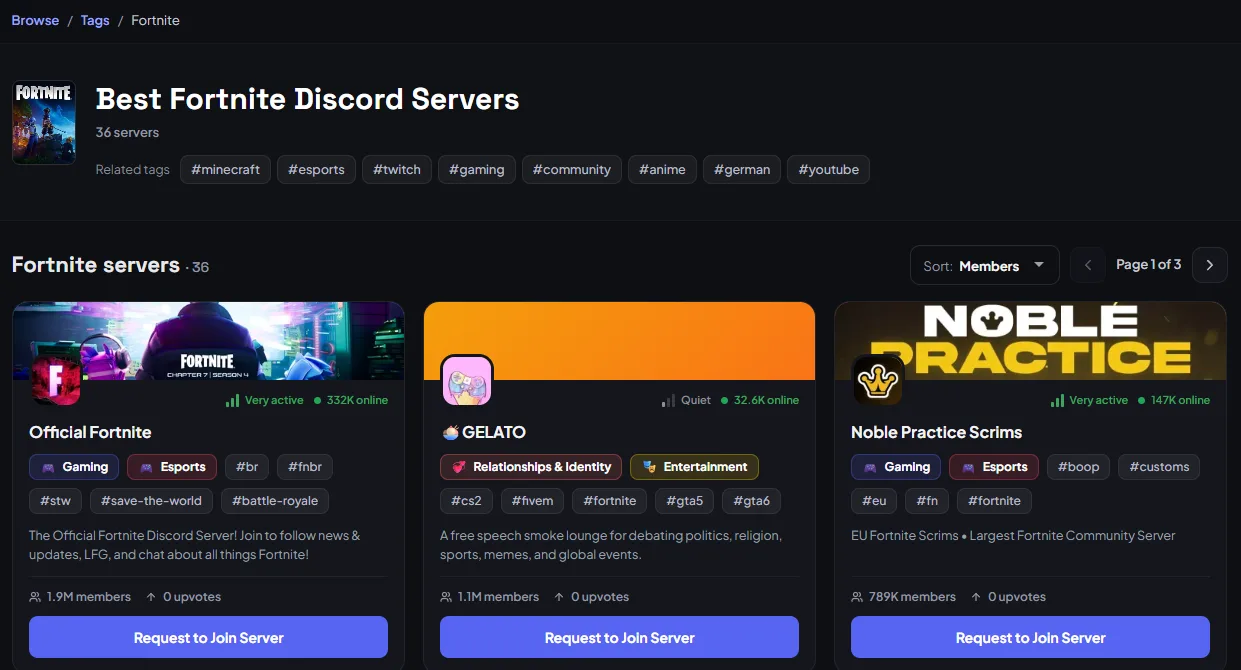
Dedicated tag pages bring relevant server listings together in one place.
You can sort the listings using the same discovery options available elsewhere on TheDiscordList. Server cards show useful information such as activity, members, tags, and online counts, helping you compare communities before joining.
Tags on server cards are also links. If you notice an interesting tag while browsing, select it to open its dedicated page and find more communities using it. Bots have their own tag directory too, and different spellings of the same tag, like #marvelrivals and #marvel-rivals, lead to one shared page.
Tags can now include information about what they name
Some tags name something specific: a video game, an anime or manga, a film or TV show, or an app. When we can confidently match a tag to one, TheDiscordList enriches it with additional information.
An enriched tag can include:
- Its proper display name
- A short introduction or summary
- Official cover artwork
- A dedicated game-focused tag page
- A richer social sharing image
This is why the Fortnite page looks different from a general topic tag. Instead of showing only #fortnite, it can provide useful context about the game before presenting the matching communities.
Not every tag is treated as a game. General tags such as #friendly, #art, or #community remain regular topic tags. Matching is deliberately conservative so an unrelated game with a similar name does not take over an everyday topic.
Why game information matters
A tag by itself can be ambiguous. A proper name, description, and recognizable cover make its purpose immediately clearer.
This improves discovery in several ways:
- Faster recognition: Cover artwork helps you identify a game without reading every listing.
- Better context: The introduction explains what the game is and what its communities may be about.
- More relevant results: Dedicated pages keep communities for the same game together.
- Easier comparison: You can review several matching servers from one page.
- Better search visibility: Clear page titles and descriptions help people find relevant Discord communities through search engines.
- More useful sharing: Game tag pages receive their own social cards with game and community information.
The result is a shorter path from “I want people to play this game with” to finding a community that fits.
Smarter tag suggestions
We have also improved how tags are selected when creating, editing, or filtering listings.
Start typing in a tag field and TheDiscordList will search the existing tag collection. The closest match comes first, and among similar matches the most-used tag wins, so established tags are easy to find and reuse.
The search covers both tag slugs and display names. It is also tolerant of partial searches and minor typing differences. For example, searching for part of a game’s name can still surface the relevant tag.
If no existing tag matches, server owners can create a new tag by entering it manually, or choose Search for another meaning to pull in a game, show or app we have not seen yet.
What this means for server owners
Server owners can add up to five tags to a listing. Choosing accurate tags gives a server more opportunities to appear in relevant searches, filters, and dedicated tag pages.
For the best results:
- Use tags that clearly describe the server
- Include the main game when the community focuses on one
- Prefer an existing suggested tag when it matches
- Add more specific tags for modes or activities, such as
#competitive,#lfg, or#scrims - Avoid unrelated tags added only for extra exposure
Using an established tag is especially valuable because it connects your listing to the same discovery page as other communities covering that topic.
A Fortnite community might use tags such as:
#fortnite#lfg#competitive#creative#scrims
These tags describe both the game and the kind of experience potential members can expect.
Use tags with advanced filters
Tags are also available inside the advanced server and bot filters.
For servers, you can combine a tag with categories, spoken language, member count, activity level, premium listings and age-restricted content (when enabled). For bots, the filters are categories, server count, Discord verification, premium listings and age-restricted content.
Selecting several tags returns listings matching any of those selected tags. Filters from different groups work together, allowing you to narrow the results further.
For example, you can search for servers tagged with Fortnite, limit the results to highly active communities, and select your preferred language.
Explore the new tag pages
Visit the Discord server tag directory to search the full collection, browse popular topics, or discover a new game community.
Whether you are looking for teammates, a competitive group, a relaxed social server, or a community built around a specific interest, improved tags make it easier to reach the right place.